Researching your family history has never been more exciting — or more accessible. With today’s mix of traditional genealogy websites, powerful search engines, and new AI tools, you can uncover family names, stories, and connections that once took years to find. Whether you’re just beginning your family tree or trying to break through a stubborn brick wall, knowing how to search effectively makes all the difference.
This guide walks you through simple, practical ways to search for family names using Google, artificial intelligence, and the major genealogy platforms.
1. Using Google to Search Family Names
Google is often the best place to start. It gathers information from millions of websites, books, newspapers, and archives — but only if you know how to ask.
Use quotation marks for exact names
Typing a name in quotes tells Google to search for that exact phrase.
- “Mary Elizabeth McLeod”
- “Giovanni Rossi” “Sudbury”
This reduces irrelevant results and helps you find people with the same spelling.
Add locations to narrow the search
Most families stayed in the same region for generations. Try combining the surname with a place:
- “O’Brien” “Ontario”
- “Kowalski” “Toronto” “immigration”
Search for specific record types
Adding keywords helps Google focus on genealogy‑related material:
- “Smith family” genealogy
- “Dubois” obituary
- “Anderson” “military records”
- “Chan” “family tree”
Try Google Books
Many older county histories, local biographies, and family compilations are fully scanned and searchable.
Search:
“Surname” + “county history”
“Surname” + “biographical sketch”
These books often list early settlers, landowners, and extended family groups.
Use Google Images for old photos
Upload an old family photo to see if it appears elsewhere online. You may find:
- Identified versions of the same person
- Photos posted by distant cousins
- Buildings or landmarks that help place the image
2. Using AI Tools to Explore Family Names
AI is transforming genealogy by making handwritten records searchable, enhancing old photos, and helping researchers spot patterns.
AI tools that help with name discovery
- Transkribus — reads old handwriting from parish registers, wills, and letters
- Google Gemini — extracts names, dates, and places from scanned documents
- MyHeritage AI Photo Enhancer — sharpens old photos so faces and details become clearer
- ChatGPT/Copilot — summarizes documents, translates old text, and helps generate research leads
AI‑powered genealogy platforms
Many genealogy websites now use AI behind the scenes:
- Ancestry — AI‑generated hints, record suggestions, and DNA connections
- FamilySearch — AI indexing makes handwritten records searchable
- Findmypast — strong AI‑indexed British and Irish newspapers
AI doesn’t replace careful research — but it speeds up the process dramatically.
3. Genealogy Databases for Surname Searches
Once you’ve gathered clues from Google and AI tools, turn to the major genealogy databases for deeper research.
FamilySearch.org (Free)
A global collection of census, church, immigration, and vital records.
Ancestry.ca
Excellent for Canadian census records, military files, and immigration documents.
MyHeritage
Strong European coverage and useful for surname variations.
Findmypast
Best for Irish, Scottish, and English parish records.
Newspapers.com
Obituaries, marriage announcements, and local stories often reveal entire family groups.
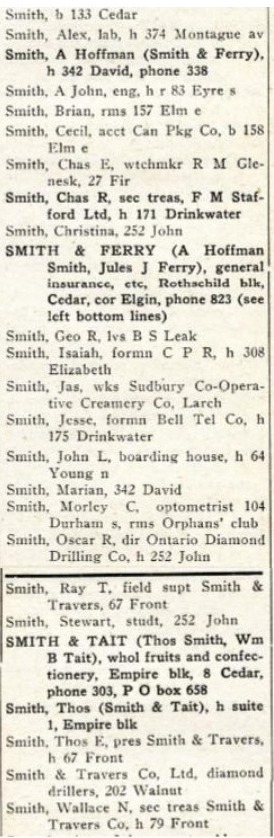
List from Vernon’s Directory
4. Tips for Better Surname Searching
- Check spelling variations — McLeod/MacLeod, O’Brien/Obrien, Schmidt/Schmitt
- Search women under maiden and married names
- Look for clusters — families often travelled with neighbours or relatives
- Use timelines — knowing when someone lived helps narrow results
- Search siblings — sometimes a brother or sister leaves a clearer trail
5. A Simple Workflow to Follow
- Start with Google: “Surname” + “location” + “genealogy”.
- Use AI tools to extract names from documents or enhance photos.
- Search major genealogy databases for records.
- Explore newspapers for obituaries and local stories.
- Repeat with spelling variations and related family groups.